
Sometimes, due to reasons out of our control, the Desktop Connector is unable to connect to the BI 4 Cloud servers to perform daily / ad-hoc refresh of your company data. Please follow the instructions below to restart the windows service.
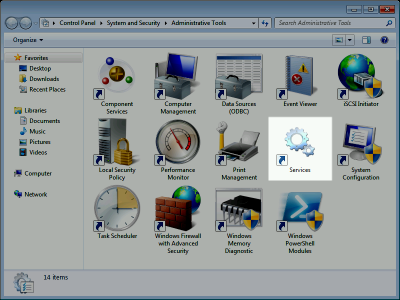
- As the Windows Administrator (or a Windows account which has administrative privileges), start the Services application, located within the Administrative Tools folder in windows control panel (Control Panel \ System and Security \ Administrative Tools).
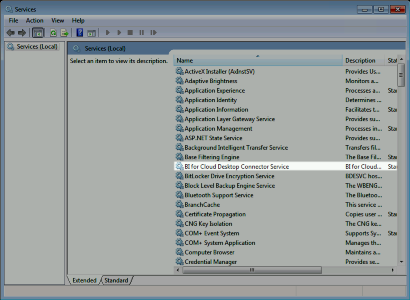
- Locate the service BI for Cloud Desktop Connector Service within the window:
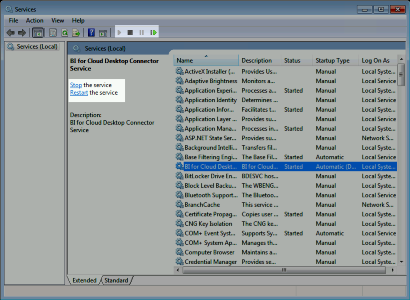
- Click on it, and from the options in the LHS panel (or the toolbar), either restart the service (if it is currently running), or Start if it has stopped:
- Within approximately 1 minute of the service being started the software will begin communicating with the BI for Cloud servers checking if any refresh requests.
Other things to check if it is still not polling then you may have a proxy server or a firewall interfering with communications. Check this article with those topics.
BI Connector : Install Troubleshooting
Still having issues? You can send the Logs and we can review them. Login to the connector and "Send Files"